

Recently, I’ve decided to create a serverless web application. I’ve published my Spring Boot application into AWS Lambda. You can see more details about how to do it in this article.
The Spring Boot application had many endpoints for the CRUD operations. All are managed in JSON. But one endpoint was responsible for uploading images. The thing is that in front of my AWS Lambda, I’ve used AWS API Gateway, and AWS API Gateway pre-format the payload when sending it to the Lambda. And this caused me sleepless nights.
Spring Boot Application
The code is quite simple when I want to receive an image into a Spring Boot application.
    @PostMapping("/images")
    public ResponseEntity<ImageDto> postImage(
            @RequestParam MultipartFile file
    ) throws IOException {
        ImageDto image = imageService.postImage(file)
        return ResponseEntity.created(URI.create("/images/" + image.getId()))
                .body(image);
    }
I need to use the MultipartFile object where I can read the binary content of the file. This object gives me access to the size of the file, the name of the file, it’s content type and it’s raw content.
API Gateway
I’ve decided to put an API Gateway in front of my AWS Lambda as it’s a way to have an endpoint to invoke my AWS Lambda. It’s a simple configuration where I indicate that the URL path of my requests is proxied to my Lambda.
This way, I can have a web application with Spring Boot in my Lambda and invoke the Lambda with simple HTTP requests.
However the API Gateway does more to the HTTP requests. It also analyzes the body and adds some headers, which caused me trouble.
The Problem
The problem is only with the binary content. As with JSON content, the API Gateway works perfectly.
But when I first uploaded an image to my Lambda, the received body had a different content type and size.
Adding the correct content type was easy. But why does the API Gateway change the size?
There is an option in API Gateway where I can specify the content type of files that I consider binary content.
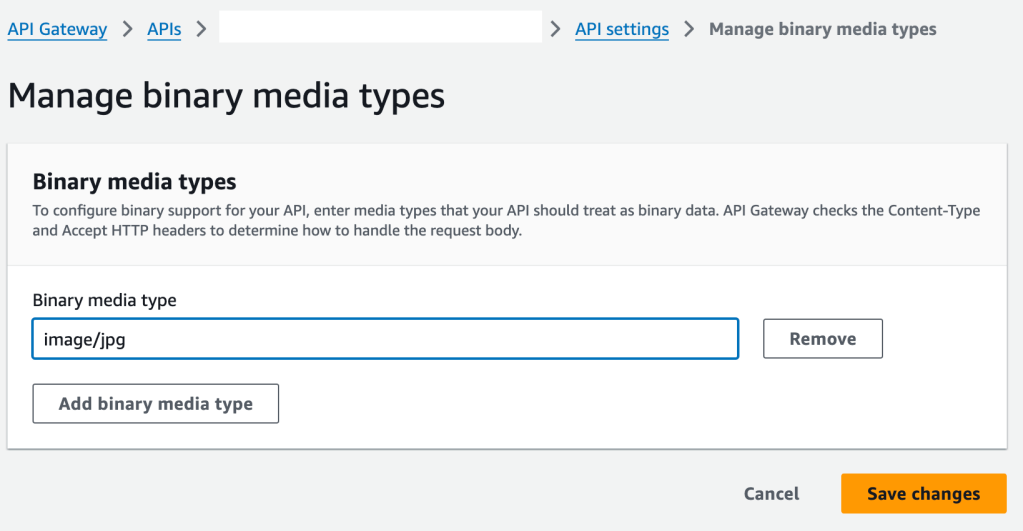
This way, the API Gateway should not pre-format those files. However, I’ve tried with image/jpeg, image/*, even / and nothing changed. If somebody knows how to use this feature, please add a comment.
What do I receive? I don’t know.
The Solution
After being frustrated over 2 days on the same problem, I decided to change my perspective. Instead of trying to send an image in the HTTP request, I’ll send JSON data (as this works fine).
How do I transform my images into JSON? I encode them in Base 64.
On the frontend side, I encode the image in Base 64 and serialize the content into a new field of my JSON body.
const handleSubmit = (e: any) => {
    e.preventDefault();

    const file = inputRef.current.files[0];
    const reader = new FileReader();
    const fileName = file.name;

    reader.onloadend = async () => {
        const result = reader.result;
        if (typeof result === 'string') {
            const base64String = result.split(',')[1];

            // Send the base64 string to the server
            await uploadImage(base64String, fileName);
        }
    };

    reader.readAsDataURL(file);
};

const uploadImage = async (base64String: string, fileName: string) => {
    fetch('http://localhost:8080/pictures', {
        method: "POST",
        headers: {"content-type": "application/json"},
        body: JSON.stringify({
            file: base64String, fileName: fileName
          })
    }});
  };
And on the backend side, I need to decode the image back to binary content.
    @PostMapping("/pictures")
    public ResponseEntity<Void> uploadPicture(@RequestBody ImageRequestDto imageRequest) {

        byte[] decoded = Base64.getDecoder().decode(imageRequest.file());

        // save the image

        return ResponseEntity.noContent();
    }
Conclusion
Converting an image to base 64 is not only the best solution to upload binary content to an AWS Lambda, but it can also be used to upload many files with different meanings (i.e. front image and back image).
 The Dev World - Sergio Lema
Leave a comment