

Welcome to the AI era, where everything changes faster than your JavaScript framework of choice. As a web developer, I spend most of my time dealing with backend logic, APIs, and front-end headaches.
But with AI taking over, staying relevant means understanding how to integrate it into my projects. So, I decided to build a Retrieval-Augmented Generation (RAG) system in just two days. Why? Because using AI tools is becoming as essential as knowing how to center a div (and hopefully, much easier).
What is a RAG?
Everyone knows how to use ChatGPT. But just like when Google arrived, not everyone knows how to ask the right question. Business-level queries are even trickier. That’s where RAG comes in.
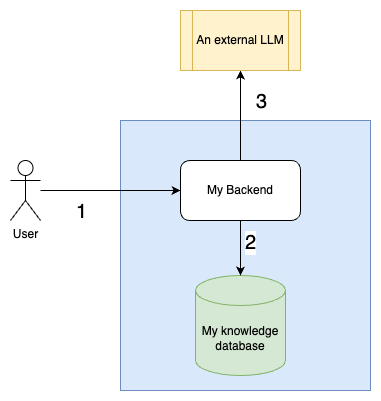
A RAG system is a fancy way of saying, “I have my own database of knowledge, and instead of blindly trusting an LLM, I make sure it retrieves the most relevant info before generating an answer.” Here’s the workflow:
- Create a database with my business knowledge.
- Figure out which part of this database is needed to answer a user’s question.
- Write a solid prompt with all the relevant context.
With this approach, I can make AI give business-specific answers instead of hallucinating its way into bankruptcy.
The Project Structure
To build my RAG system, I needed three main components:
- An LLM service – To generate responses, using APIs like OpenAI, LLaMA, or DeepSeek.
- A web server – I chose Flask because it’s simple and I don’t have time for overcomplicated setups.
- A retrieval service – FAISS (Facebook AI Similarity Search) to handle my business data.
The Information Retrieval
This is where things get serious. Storing data in an index database isn’t just a copy-paste job. I had to break the information into chunks—small, meaningful pieces, like the answer to a single question. The steps are:
- Chunk the data – Each chunk should be self-contained and useful.
- Index the chunks using FAISS – This allows efficient retrieval of relevant parts.
- Find the right chunks based on the user’s question – FAISS helps identify the most relevant pieces.
Without good information retrieval, my RAG system would be as helpful as a tutorial that only works on the author’s machine.
class InfoRetrievalService:
    def __init__(self):
        model_name = "sentence-transformers/paraphrase-multilingual-MiniLM-L12-v2"

        self.indexed_files = []

        # Load the encoding model
        self.encodeing_model = SentenceTransformer(model_name)
        self.encodeing_model_name = model_name
        self.d = self.encodeing_model[-1].out_features

        # Creation of the index and document info
        self.index = faiss.IndexFlatL2(self.d)
        self.chunks = []

    def save_data_to_index(
        self,
        path: str,
        file_fileame: Optional[str] = None,
    ) -> None:

        with open(path, encoding="utf-8") as f:
            content = f.read()

        text = [content]
        embeddings = self.encodeing_model.encode(text)
        self.index.add(embeddings)

        self.chunks.extend([content])

        file_name: str = str(path) if path else str(file_fileame)
        self.indexed_files.append(file_name)

    def read_info_from_index(self, questions: str, k: int = 10) -> list[str]:
        text = [questions]
        questions_embeddings = self.encodeing_model.encode(text)
        distence_matrix, index_matrix = self.index.search(questions_embeddings, k=k)
        return [self.chunks[i] for i in index_matrix.tolist()[0]]
The LLM
This part is relatively simple:
- I send an API request to an LLM provider like OpenAI or LLaMA.
- I structure the prompt carefully:
- A system prompt that includes my company’s description, the expected response format, and the user’s persona.
- A user prompt that contains the retrieved context and the user’s question.
- Return the response directly to the user. If I did everything right, I need no post-processing.
class LLMService:

    def ask_llm(self, prompt: str) -> str:
        client = openai.OpenAI()

        message_content = [
            {"type": "text", "text": prompt},
        ]

        chat_response = client.chat.completions.create(
            model="meta/llama-3.2-90b-vision-instruct-maas",
            messages=[
                {"role": "system", "content": self.agent_config},
                {"role": "user", "content": message_content},  # type: ignore
            ],
        )

        return chat_response.choices[0].message.content
Conclusion
Two days is enough to build a basic RAG because:
- The web server is easy to set up.
- The LLM API request is straightforward.
- The hard part is information retrieval: it has to be precise.
To test my setup, I needed a dataset. So, I got creative: I took famous movie sagas (Star Wars, The Matrix, Lord of the Rings, Back to the Future) and replaced the hero names with Pokémon names. Now, if someone asks a question about those movies, my RAG system answers using Pokémon characters instead of the actual heroes. This proves that my system retrieves my data, not just relying on the LLM’s built-in knowledge.
Mission accomplished!
 The Dev World - Sergio Lema
Leave a comment