

The SSH keys provide a secure and convenient way to authenticate without the need for passwords. It can be used to manage remote servers, working with Git or automate secure file transfers.
In this article, I explain how to create SSH keys on Linux, MacOS and Windows, what are the main SSH keys types and how do they work in an SSH communication.
How do SSH keys work?
When generating SSH keys, we have a public key and a private key. The public key is the only one to share. The private key must be kept secure and never shared.

The public key must be shared with remote severs when I need to communicate with them; or with a Git repository to ensure secure communication.
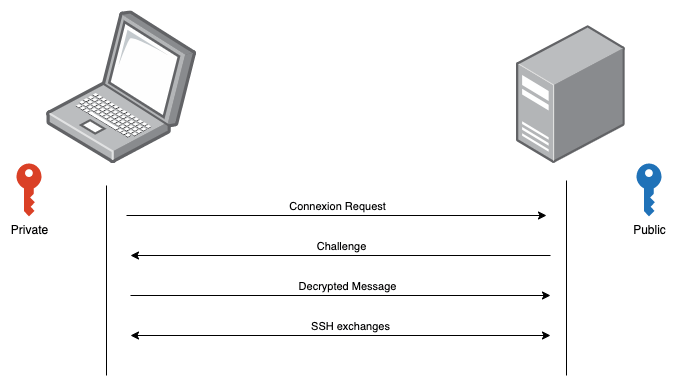
Here are the steps to authenticate the SSH communication with the SSH keys:
- First, our laptop sends a connexion request to the remote server. Here are sent some information about the public key.
- Then the remote server first checks if the received request is authorized. This is done by looking in the ~/.ssh/authorized_keys file. If the request is authorized, a random challenge is generated and encrypted by the public key.
- My laptop receives now the challenge, and it must decrypt it using the private key. Once decrypted, it’s sent back to the remote server.
- If the decrypted message corresponds to the original one, it proves that I possess the corresponding private key. From now on, I can communicate with the remote server using encrypted messages.
Which Tools Do I Need?
To generate an SSH key, I always use OpenSSH. On Linux, it’s generally pre-installed. On MacOS, it’s also pre-installed. And for Windows, if I use Git for Windows, it’s also included.
OpenSSH is a tool which allows SSH communication and generate many SSH keys. It consists in an SSH client to establish SSH communications; a key management to generate SSH keys; and an SSH daemon which accepts SSH communications.
What Are the Different SSH Key Types?
There are plenty of SSH Key types depending on the features, strengths and use cases. Here are the main types of SSH keys.
RSA
This is the most used. It can have a key length of 2048 bits or 4096 bits. The longer, the better. It’s highly secure and widely used for SSH communication and Git operations.
DSA
Was once very popular, but not obsolete and replaced by RSA. It has a fixed key length of 1024 bits, which makes it less secure than RSA. It’s still used in legacy systems, but it’s recommended to switch to RSA.
ECDSA
Provides a high level of security with smaller keys. The key lengths can be 256 bits, 384 bits or 521 bits. With smaller keys, it makes ECDSA more efficient in terms of speed and resources usage. It’s ideal for mobile and embedded systems where the performance and power efficiency are critical.
ED25519
Considered one of the most secure and efficient. It has a fixed key length of 256 bits. It offers a very high security with very short key length. It’s designed to be fast. It’s only supported in recent versions of OpenSSH and other modern systems.
How To Generate An SSH Key?
Let’s generate an RSA key from a terminal.
ssh-keygen -t rsa -b 4096 -C "your_email@example.com"
It’s the same command for Linux, MacOS or Windows using Git for Windows.
The t parameter indicates the key type. The b parameter indicates the size of the key. And the C parameter indicates the name of the name.
The ssh keys are generated into a specific folder depending on the platform. For Linux, the keys are generated at /home/your_username/.ssh/. For MacOs, they are also located at /home/your_username/.ssh/. And for Windows, they are located at C:\Users\your_username\.ssh\.
The generated keys are:
- A public key: This is the key to share with others, or copy to a remote server in the authorized_keys file. The public keys have the suffix pub. For example, an RSA public key starts with ssh-rsa and ends with the name of the key.
- A private key: This key must never be shared. It’s used by the local SSH client to authenticate when connecting to a server. For example, an RSA private has the following format:
-----BEGIN RSA PRIVATE KEY-----
[...]
-----END RSA PRIVATE KEY-----
Conclusion
Generating an SSH key is something that’s only done once received a new computer. I only generate new ones when a server needs a different type of key. But this is very rare.
 The Dev World - Sergio Lema
Leave a comment