

Some days ago, I created a React application that I wanted to deploy on AWS S3. I followed all the steps described in this article, but when I tried to use some advanced features like routers, I ended.
React Router
The Router allows me to have different URLs to manage different parts of my application. I may have /vehicles for the search page of the vehicles. /vehicles/<id> for the details page of a single vehicle, and /vehicles/new for the subscription page of a new vehicle.
To do so, I need to install React Router and configure Webpack.
Let’s first install React Router.
npm install react-router-dom
And now, I need to configure Webpack to indicate the file which handles the routes. I need to modify the webpack.config.js file.
module.exports = {
  output: {
    path: join(__dirname, './dist/my-frontend'),
    publicPath: '/',
  },
  devServer: {
    port: 4200,
    historyApiFallback: true,
  },
  plugins: [...],
};
The thing is that all this works fine in my localhost. I can even copy and paste a URL and the React application loads the adequate view.
However, after deploying in the AWS S3, I encountered the following error: Access Denied with a 403 error code.

Why?
When working in localhost, I have Webpack which acts as a web server. But when working in AWS S3, all the application is stored in the index.html file. When I try to access another page, AWS S3 tries to load a different static file, which does not exist.
The key is that I’m missing a web server. But all my React application fits into the index.html file, so I don’t need one. How can I solve this?
CloudFront
AWS CloudFront is a CDN, a Content Delivery Network. It’s a service which distributes my content, my React application in this case, all around the world. This way, I have a faster download time when viewing my application in France or the USA.
A common use case of AWS CloudFront is creating a distribution and having an AWS S3 bucket as the origin. This way, AWS CloudFront distributes the content of the AWS S3 all around the world.
But now, I need to configure my AWS S3 bucket to allow my AWS CloudFront distribution to read from it.
{
    "Version": "2012-10-17",
    "Statement": [
        {
            "Sid": "AllowCloudFrontServicePrincipalReadOnly",
            "Effect": "Allow",
            "Principal": {
                "Service": "cloudfront.amazonaws.com"
            },
            "Action": "s3:*",
            "Resource": "arn:aws:s3:::my-bucket/*",
            "Condition": {
                "StringEquals": {
                    "AWS:SourceArn": "arn:aws:cloudfront::1234567890:distribution/ABCDEF98765"
                }
            }
        },
        {
            "Sid": "AllowEveryoneReadOnly",
            "Effect": "Allow",
            "Principal": "*",
            "Action": "s3:*",
            "Resource": "arn:aws:s3:::my-bucket/*"
        }
    ]
}
I still need to make my content public, as described in my previous article.
But this use case does not solve my problem.
Error Pages
However, AWS CloudFront has a configuration that solve my problem.
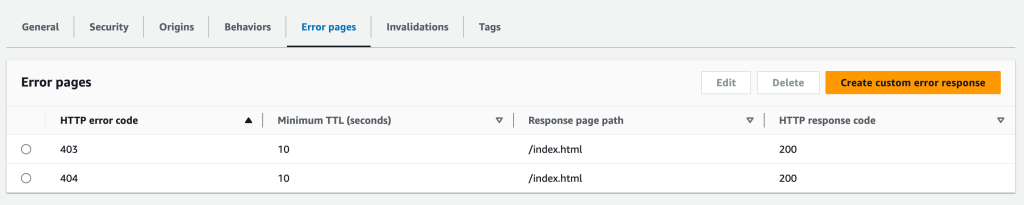
After creating my distribution, I can add some behavior for the error pages. What I want is that when the page is not found, it loads the index.html file. But I have to do it using a 200 HTTP response code, otherwise, the browsers or the Search Engines will consider this behavior an error.
If I have some authentication in my application, I must also do the same redirection when a 403 HTTP error code occurs.
The problem with the URLs is now solved. But I have a new problem now. As I’m using a CDN, it stores the content of the AWS S3 bucket in several places around the world. Caching the content.
But when I need to update my application, I need to tell both AWS S3 and AWS CloudFront that the content is new.
In the AWS CloudFront panel, I have an invalidation tab to revoke the cache on some files. But I need a way to do it from a CI/CD pipeline.
CI/CD
I can’t have manual operations to update my frontend application. I need to update my frontend from a CI/CD platform such as Github Actions or GitlabCI.
I can add this configuration to AWS S3. When I upload the content to AWS S3, I can indicate the cache control for each file.
So, I need to tell that all the files must be cached as long as possible. But the index.html shouldn’t. Here are the commands:
aws s3 sync --delete --cache-control 'max-age=604800' --exclude *.html . s3://my-bucket
aws s3 sync --delete --cache-control 'no-store, no-cache' . s3://my-bucket
The first line uploads the content of my frontend to the AWS S3 bucket. It indicates the age of the cache (7 days). But with this first line, I upload the files excluding the HTML files.
And the second line, I upload the rest of the files and set the cache control to no-cache.
Conclusion
With the configuration shown, AWS S3 + AWS CloudFront, my frontend application is faster than just using AWS S3. I don’t even need to configure my AWS S3 as a static website, as this is done with AWS CloudFront (which is a static website by default).
 The Dev World - Sergio Lema
Leave a comment