

When I’ve decided to migrate the calculation process to AWS Lambda, I didn’t take into account the enormous CPU consumption on RDS this will lead.
Still, there is a solution for that, the Proxy RDS.
Let’s go back to add some context.
Context
We have a Python/Flask application running in AWS ECS. With RDS Postgres as database. We have two tables, products and colors. After applying a calculation process,
I get the combination of those two tables into a third one, combinations. The combinations table will be used for a search system.
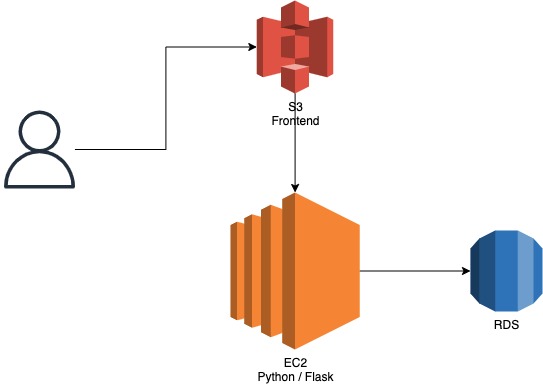
We’ve decided to have a separate table for the search system, to avoid complex joins and optimize the time response. But this require to have
the calculation process in place.
Our first option is to have the calculation process directly into the backend application. Still, during the working hours, the CPU consumption
of the backend application reaches the 100% and makes the backend response times higher for a regular usage.
So, we planned to migrate the calculation process into AWS Lambda. This way, I expected the backend application to reduce a lot its CPU consumption (which was the case).
As I can trigger multiple AWS Lambda in parallel, I can even go faster with the calculation. Another good new.
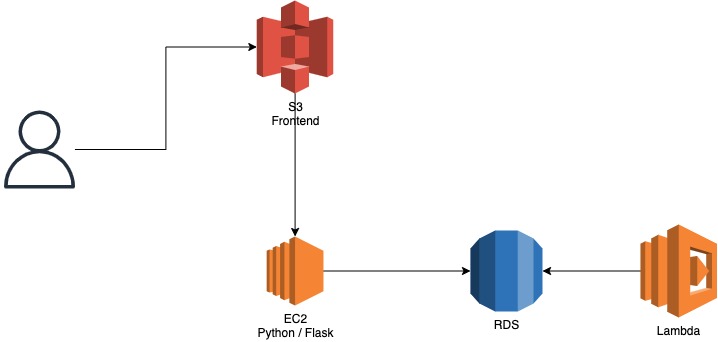
The AWS Lambda has some limits, as the max execution time is 15 minutes. But our calculation process takes about 5 minutes. We are safe.
But there was a pain point. The database.
Running the Lambdas
The AWS Lambdas can now scale up with the load. But the database remains the same.
Still, the calculation process consumes a lot of CPU with simple operations, I assumed the database won’t be much impacted.
I was wrong.
The first day after the migration, 200 Lambdas started togheter. The database saturated at the moment.
The max number of connections to the database was 180. The CPU consumption of the database reached the 100% and took 2 hours to return to an acceptable level.
The first thing to do, limit the number of concurrent Lambdas.
Concurrent Lambdas executions
We decided to be conservative, and put the limit to 50.
But the CPU consumption of the RDS still high. Having 50 Lambdas running in parallel still make the CPU reaches 100%.
It should be like having 50 customers navigating through a website. This can’t saturate the database.
Why?
Each time an AWS Lambda starts, a connection to the database is created. This simple connection consumes a little of CPU. This little multiplied per 50 makes a lot. Without taking into account the following queries to the database.
Here comes the second fix. The Proxy RDS.
Proxy RDS
Using a Proxy RDS, all the Lambdas will use the same physical connection to the database. So, no implicit consumption just for starting a new Lambda.
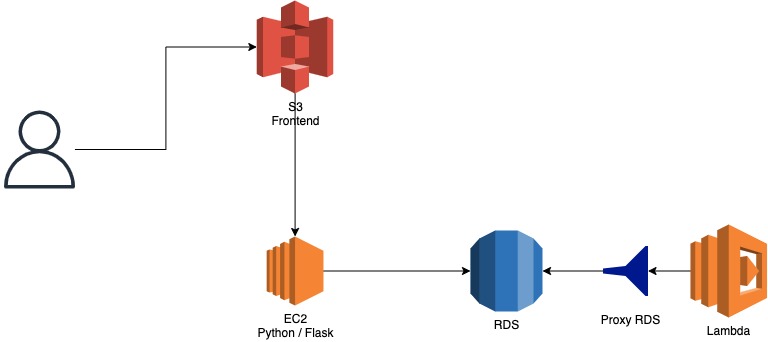
Great, now I can scale up my concurrent Lambdas to 200.
But, the number of logical connections to the database remains to 180.
So, if I trigger too much Lambdas, there won’t be enough for the backend application.
The solution? Increase the max number of logical connections? But each time I increase the concurrent Lambdas I must edit the max number of connections to the database.
Instead, there is an option in the Proxy RDS, which limits the consumption of the number of connections. With a percentage value.
This way, my backend will always have a slot to connect to the database.
Conclusion
The key point with the Proxy RDS, is that the Proxy RDS consumes logical connections, not physical connections. Still, I must close and release all the resources at the end of the Lambda to ensure no residual connections are open for the following Lambda executions.
After working with this configuration for almost 6 months, we’re safe to increase the concurrent executions of the Lambda to 200.
If you want to learn more about good quality code, make sure to follow me on Youtube.
 The Dev World - Sergio Lema
Leave a comment