

In this article I show how to configure pre-commit in a Python project to format and check the code. I will show 4 tools which will run automatically with the Git hooks.
Content:
- Pre-commit
- isort
- black
- mypy
- flake8
- Git commit
Check this video for more details.
All the code of the article is available in this repository.
Pre-commit
The pre-commit hooks are actions that will be run every time i try to create a commit. If all the actions run correctly, without any error, the commit will be done. Otherwise, if some error occurs, the commit will be aborted and i can still edit my code. The hooks are a tool of Git. And the pre-commit is a library which allows me to connect multiple actions to the Git hooks easily.
repos:
  - repo: <github_repo_1>
    rev: <version_1>
    hooks:
      - id: <name_1>
  - repo: <github_repo_2>
    rev: <version_2>
    hooks:
      - id: <name_2>
With pre-commit, I specify the Github repository to download the action, the version I want, some other options, and in which order I want the actions to be run. Because the order is very important. I will have some actions which will modify my code and some others which will check my code. I don’t want my checkers to check a code that will be modified in the next step. The first one must modify the code, then, in a stable version, I can check the code.
Let’s first install pre-commit. I will install it as a development dependency. As i don’t need it while running my production code.
> poetry add -D pre-commit
Then all the configuration will be in the file .pre-commit-config.yaml. Here we’ll be located all the actions. And when adding a single action, I must install it. Let’s go with the first one.
isort
isort is a tool which will sort and organize all the imports of my project. It will sort them alphabetically. First the absolute imports, then the relative imports. First the raw imports, then the inner imports. First the external libraries, then the modules from my projects. It will also sort the imports within a line, when i import multiple modules from a single library. And it will also split a long import in several lines if necessary. Let’s configure it.
repos:
  - repo: https://github.com/pre-commit/mirrors-isort
    rev: v5.10.1
    hooks:
      - id: isort
Let’s now install it and run it.
> poetry run pre-commit install
> poetry run pre-commit run -a
Here, I can see the files which were modified.
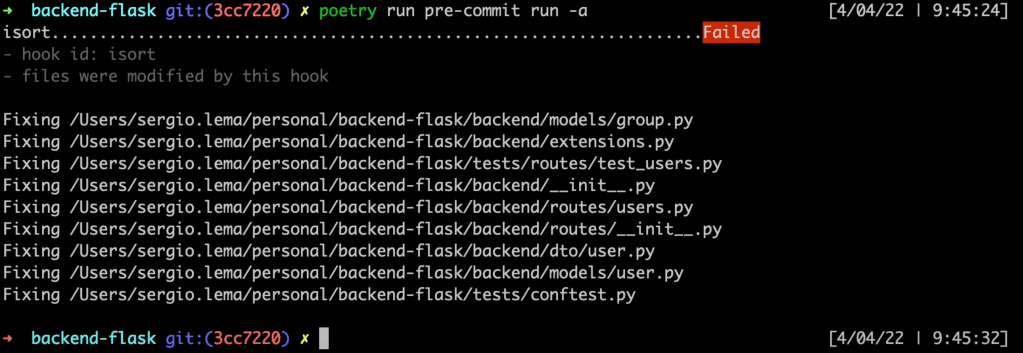
With the argument -a of pre-commit, I indicate to pre-commit to run all the actions. Nevertheless, this can be done with a git commit. But I have more tools to add before creating my commit.
black
black is a code formatter. It will modify my code to satisfy the code conventions of Python. Using double quotes for string. Spaces after the commas. Split long lines. The indentation in long lines. And a lot more things. Let’s add it.
  - repo: https://github.com/psf/black
    rev: 22.3.0
    hooks:
      - id: black
But now, I want to customize a little bit the behavior of black. By default, it will split a line which is longer than 80 characters. But i want bigger lines. I want lines until 120 characters. I can add this configuration in my home directory (~/.black) for all of my projects, I can also add this same file in the current project (.black). This way, it only impacts the current project. And I can also integrate it in my pyproject.toml file of Poetry, to have all the configurations together.
[tool.black]
line_length = 120

[tool.isort]
profile = "black"
I also need to add the configuration for isort, as it also splits a line when it’s too long. With this configuration of isort, both tools are linked and use the same line length.
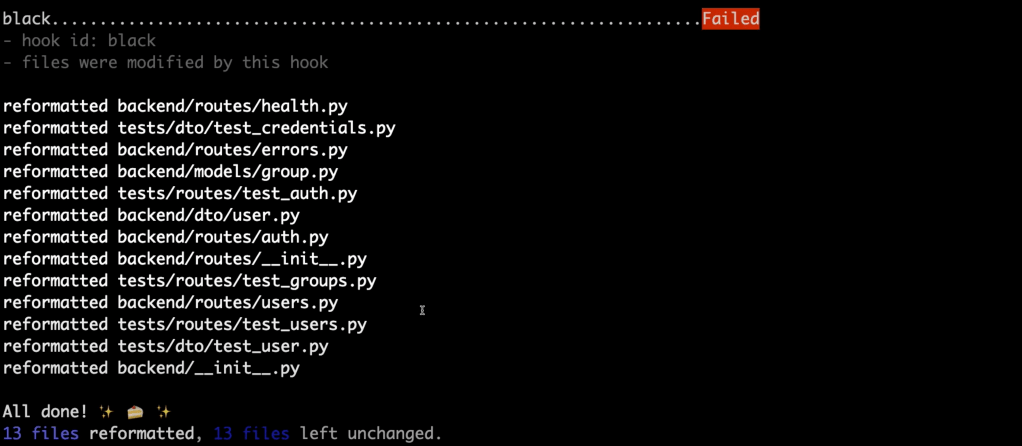
Here are the files which were modified.
If at some point I want black not to format a piece of code, i have to surround it with the following comments:
# fmt off
...
my code which won't be formatted
...
# fmt on
mypy
mypy is a type checker. It will check that a variable contains the same value type and is used correctly. I mean, if I store a string into a variable, mypy will check if there is no arithmetic operations on that variable. As it will lead to an error. mypy won’t make any change in the code. It will just perform checks and return the status of the checks.
  - repo: https://github.com/pre-commit/mirrors-mypy
    rev: v0.942
    hooks:
      - id: mypy
In the pyproject.toml file, I just add the entry with no option. Just to show that i’m able to configure mypy from the pyproject file.
[tool.mypy]
And let’s now install it and run it.

I can see that mypy is unable to verify the type of the “id” variable. Let’s check the code.
class User(db.Model):
    __tablename__ = user_table_name

    id = db.Column(db.Integer, primary_key=True)
    username = db.Column(db.String(80), unique=True, nullable=False)
    password = db.Column(db.Text, nullable=False)
    email = db.Column(db.String(120), unique=True, nullable=False)

<strong>    country_id = db.Column(db.Integer, db.ForeignKey(Country.id))  # here is the problem</strong>

    country = relationship(Country.__name__)
    profile = relationship("Profile", uselist=False, back_populates="user")
mypy is unable to verify the type of the variable Country.id. As this variable is used in my code, mypy must validate its type. Nevertheless, I’m sure it’s used correctly here. So, I can ignore it like that.
country_id = db.Column(db.Integer, db.ForeignKey(Country.id)) # type: ignore
flake8
flake8 is the last tool i will show today. flake8 is a code style checker. I have black which is a code formatter. And flake8 which will check the final result. As said before, the tools which modify the code must be first, as isort and black. And the tools which check my code must be last, as mypy and flake8. flake8 will perform a lot more checks than what will be done with black. flake8 will check the code style upon the PEP8 style guide.
  - repo: https://gitlab.com/pycqa/flake8
    rev: 4.0.1
    hooks:
      - id: flake8
Nevertheless, with flake8, I can’t integrate my configuration inside the pyproject.toml file. I will need a separated file, .flake8. And I will need to put the same configuration as I’ve added for black, to be sure that both are synchronized.
[flake8]
max-line-length = 120
exclude = tests/*
max-complexity = 10
And let’s now install it and run it.

I must correct all of those errors if i want flake8 to run correctly. Nevertheless, if I want to skip a single line, i need to append the following comment at the end of the line.
# noqa: F401
The last number refers to the rule to be ignored. flake8 always tells which rule fails in the report.
Git commit
When running a git commit, it will only run the hooks on the modified files. If I want to run over all the files, I must run directly pre-commit as before.
Conclusion
- I’ve installed the pre-commit dependency to run some hooks automatically when creating a commit.
- I’ve added isort to organize the imports.
- I’ve added black to format my code.
- I’ve added mypy to check the static types of my code.
- And I’ve added flake8 to check the code style guidelines of Python.
- All of these run automatically every time i try to create a commit.
- Nevertheless, if i really want to skip those hooks to run, at my own risk, I can skip them with this command: git commit –no-verify
 The Dev World - Sergio Lema
Leave a comment