

In this article I will show the usage of the Spring Cloud Gateway filters for the authentication. I will start creating and describing a Spring Cloud Gateway project, what are the filters and how they work. Then, I will use them to perform the authentication of my microservices architecture.
Content:
- The API Gateway design pattern
- Routes and Predicates
- Gateway filter
- requests to the microservices from the Gateway filter with the Spring Cloud Netflix Ribbon Load Balancer.
For more details, watch this video.
Check this repository for all the code used in the article.
The API Gateway design pattern
In a previous article I’ve implemented a backend-user, which was another microservice, but with public access. This microservice was a web application, whose main role was to build a complete response calling the private microservices; and return the complete response to the user. But this solution isn’t a good one. Having a microservice to build a complete response calling the inner microservices will lead to a more complex system. Because, with time, instead of adding the complexity to the adequate microservice, i will tend to add it to this backend. It will be first some mapping, then some conversions, then some calculations, and finally, you have your spaghetti code.
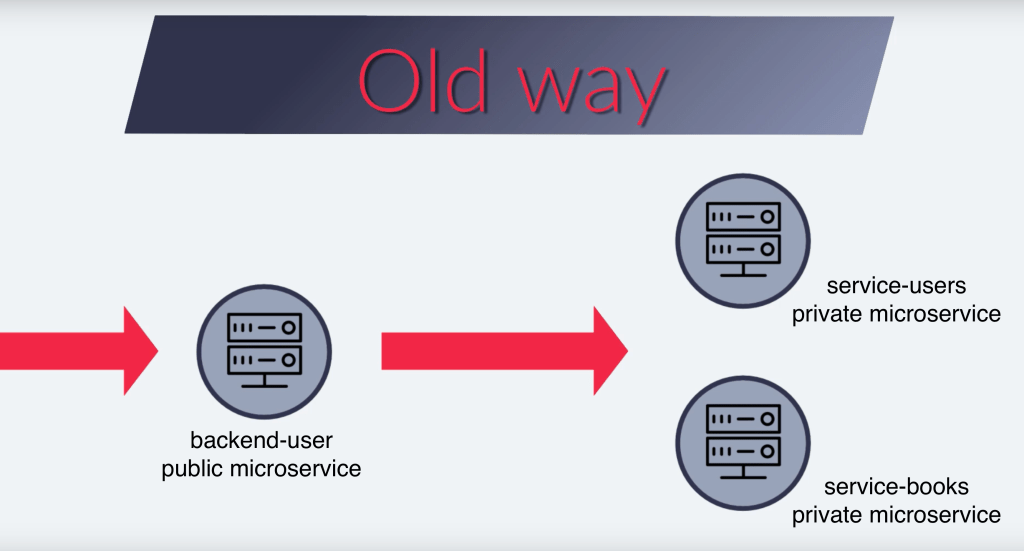
This is why the API Gateway is a better solution for this case. The API Gateway will just redirect the incoming request to the inner microservices. It should have no more logic than that. It should have no more complexity than that. Then, the inner microservices, each one, will be responsible to deliver a complete response. Each microservice will need to communicate with the other to obtain the necessary information to build a complete response for the user.

Routes and Predicates
Let’s start by adding the maven dependency. And I must ensure to remove the web dependency.
    <dependency>
        <groupId>org.springframework.cloud</groupId>
        <artifactId>spring-cloud-starter-gateway</artifactId>
    </dependency>
I will redirect all the requests which start by “books” to the books microservice; and all the requests which start by “prices” to the prices microservice.
spring:
  application.name: backend-user
  cloud:
    gateway:
      discovery.locator.enabled: true
      routes:
        - id: service-books-id
          uri: lb://service-books
          predicates:
            Path=/books/**
          filters:
            - AuthFilter
        - id: service-prices-id
          uri: lb://service-prices
          predicates:
            Path=/prices/**
          filters:
            - AuthFilter
        - id: service-users-sign-in
          uri: lb://service-users
          predicates:
            Path=/users/signIn
This option spring.cloud.gateway.discovery.locator.enabled will let me use the name of the microservices as they are registered in the Eureka Service Discovery. With the prefix “lb“, I use the Spring Cloud Netflix Ribbon Load Balancer to distribute the request to the microservice.
Within the predicate, I specify the conditions which make the request use this route. And as condition, I will only use the URL path with a regex, a start condition on the URL.
One last thing, the Gateway has a different way to be monitored, instead of using the regular Actuator configuration.
management:
  endpoint.gateway.enabled: true
  endpoints.web.exposure.include: gateway
With the configuration, i can handle multiple cases with different predicates; and multiple predicates for a single route. But let’s implement something more difficult. Let’s intercept each request and validate it’s really authenticated before continuing the routing. For that, i will use a custom filter, a Gateway Filter.
Gateway Filter
The Gateway Filters work as the HTTP Filters. They will intercept the incoming requests, I can add all the logic I want, then, let the requests continue to their destinations. And when finished, I can again add some logic to the returned response.
I will first add the Reactive Web Client, to allow me perform requests to other microservices. This client will read the information from the Eureka Service Discovery to map the services name with their IPs and ports.
@Configuration
public class WebClientConfig {

    @Bean
    @LoadBalanced
    public WebClient.Builder loadBalancedWebClientBuilder() {
        return WebClient.builder();
    }
}
Let’s now create the Gateway Filter.
@Component
public class AuthFilter extends AbstractGatewayFilterFactory<AuthFilter.Config> {

    private final WebClient.Builder webClientBuilder;

    public AuthFilter(WebClient.Builder webClientBuilder) {
        super(Config.class);
        this.webClientBuilder = webClientBuilder;
    }

    @Override
    public GatewayFilter apply(Config config) {
        return (exchange, chain) -> {
            if (!exchange.getRequest().getHeaders().containsKey(HttpHeaders.AUTHORIZATION)) {
                throw new RuntimeException("Missing authorization information");
            }

            String authHeader = exchange.getRequest().getHeaders().get(HttpHeaders.AUTHORIZATION).get(0);

            String[] parts = authHeader.split(" ");

            if (parts.length != 2 || !"Bearer".equals(parts[0])) {
                throw new RuntimeException("Incorrect authorization structure");
            }

            return webClientBuilder.build()
                    .post()
                    .uri("http://service-users/users/validateToken?token=" + parts[1])
                    .retrieve().bodyToMono(UserDto.class)
                    .map(userDto -> {
                        exchange.getRequest()
                                .mutate()
                                .header("X-auth-user-id", String.valueOf(userDto.getId()));
                        return exchange;
                    }).flatMap(chain::filter);
        };
    }

    public static class Config {
        // empty class as I don't need any particular configuration
    }
}
I will add the empty class Config as i don’t need any particular configuration.
webClientBuilder.build().post().uri() will make the request to the service-users microservice. And I read the response into to the UseDto class with retrieve().bodyToMono(). And with exchange().getRequest().mutate(), I edit the request adding a new header, a header with the user ID information, which will be sent to the target microservice. And, as with the HTTP filter, call the filter chain at the end.
With the last rule of the configuration, I redirect all the signIn routes to the service-users microservice. This way, I get my authentication information. The following requests must be made with the authentication information, the Bearer header, and the user information will be intercepted by the AuthFilter.
Conclusion
- I’ve added the Spring Cloud Gateway dependency to handle the API Gateway pattern;
- I’ve configured the routes adding the target microservice and the predicates;
- To target the microservices, I’ve used Netflix Ribbon Load Balancer;
- And I’ve created the Gateway Filter, AuthFilter, which intercepts all the requests.

 The Dev World - Sergio Lema
Leave a comment